The
Mutable Net
About
The Project
〔←〕
Node/09
Task /01: The Device
Designed by:
Mirko Malagoli
Date:
09-05-2026
Brand:
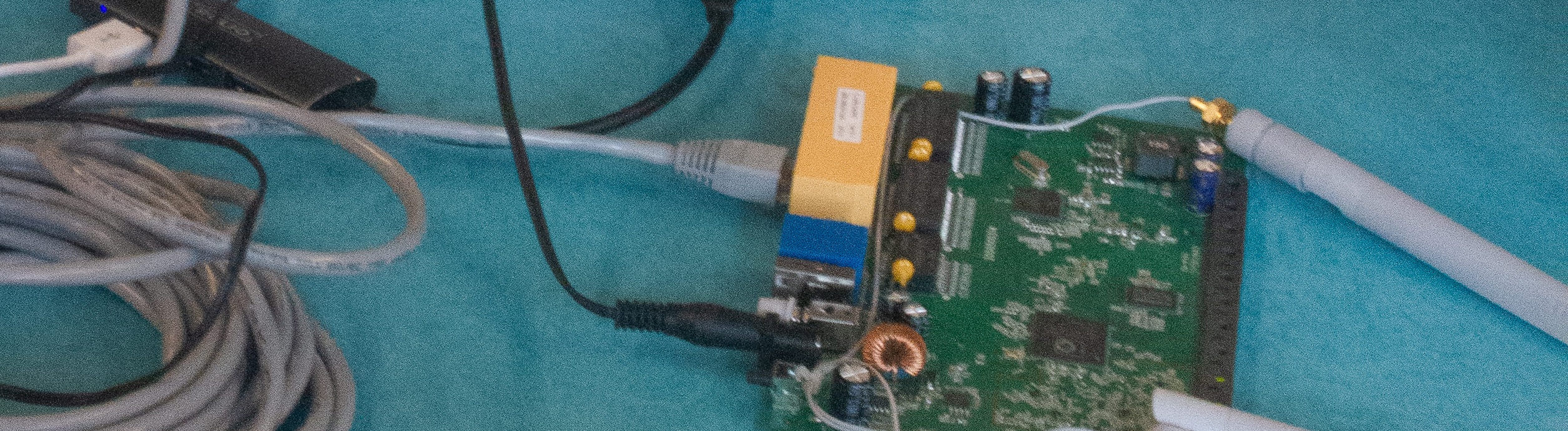
TP-Link
Model:
TL-WR1043ND
Hardware Version:
v4
Year of Production:
c. 2016
Chipset:
Qualcomm Atheros QCA9563
Flash Memory:
16 MB
RAM:
64 MB
Node Name:
—
Sources:
Task /02: Accessing the Device Interface
Struggle Accessing?:
Yes.
Errors & Fixes:
Google Chrome did not load the router interface. Switched to Safari and used it throughout the whole workshop.
Admin Login:
admin / admin
Interface Description:
Modern graphical TP-Link factory firmware UI.
Factory Firmware Version:
Not recorded. Noted as a recent version, consistent with v4 16 MB flash layout.
Task /03: Downloading OpenWrt
Image File:
openwrt-25.12.3-aa26918d7f83-ath79-generic-tplink_tl-wr1043nd-v4-squashfs-sysupgrade.bin
(recalled approximately)
Target / Architecture:
ath79 / generic / mips_24kc
Chosen Configuration:
Default: sysupgrade image via factory firmware web interface.
Did it work?:
Yes, but not smoothly.
Errors & Fixes:
First attempt failed on Windows. Switching to a Mac resolved the issue, flashing completed successfully from macOS.
Sources:
Task /04: Installing OpenWrt
Errors & Fixes:
Difficulties maintaining a stable connection between Baltan Wi-Fi and the router during the flashing process. The two networks conflicted during upload.
Accessibility — Login Steps:
After flashing: connect via ethernet → SSH to 192.168.1.1 as root (no password on first boot) → set password → access LuCI at 192.168.1.1.
Device Behaviour:
LEDs lit up and cycled during flash. Router SSID changed name, new OpenWrt access point appeared in the Wi-Fi list.
Task /05: Downloading LibreMesh
File Downloaded?:
Yes.
Version:
LibreMesh 2024.1 "Fantastic Forwarder", based on OpenWrt 23.05.5
Image File:
libremesh-2024.1-ath79-generic-tplink_tl-wr1043nd-v4-squashfs-sysupgrade.bin
Generated Successfully?:
Yes, generated via firmware-selector.libremesh.org using default flavor (lime_default).
Errors & Fixes:
—
Sources:
Task /06: Installing LibreMesh
Did it work?:
—
Device Behaviour:
—
Duration:
—
Errors & Fixes:
—
Task /07: Results
Access Point Visible?:
Yes, 9 other LibreMesh nodes visible in the Wi-Fi list.
Access Point Name:
LibreMesh… (full name not recorded)
Connection Possible?:
Yes.
thisnode.info Interface:
9 nodes listed on the left with names. Real-time connectivity speed shown on the right. The interface was in the process of assigning names to the different nodes in the network.
〔↘〕 download as pdf
Task /01The Device
Designed by:
Mirko Malagoli
Date:
09-05-2026
Brand:
TP-Link
Model:
TL-WR1043ND
Hardware Version:
v4
Year of Production:
c. 2016
Chipset:
Qualcomm Atheros QCA9563
Flash Memory:
16 MB
RAM:
64 MB
Node Name:
—
Task /02Accessing the Device Interface
Struggle Accessing?:
Yes.
Errors & Fixes:
Google Chrome did not load the router interface. Switched to Safari and used it throughout the whole workshop.
Admin Login:
admin / admin
Interface Description:
Modern graphical TP-Link factory firmware UI.
Factory Firmware Version:
Not recorded. Noted as a recent version, consistent with v4 16 MB flash layout.
Task /03Downloading OpenWrt
Image File:
openwrt-25.12.3-aa26918d7f83-ath79-generic-tplink_tl-wr1043nd-v4-squashfs-sysupgrade.bin
(recalled approximately)
Target / Architecture:
ath79 / generic / mips_24kc
Chosen Configuration:
Default: sysupgrade image via factory firmware web interface.
Did it work?:
Yes, but not smoothly.
Errors & Fixes:
First attempt failed on Windows. Switching to a Mac resolved the issue, flashing completed successfully from macOS.
Task /04Installing OpenWrt
Errors & Fixes:
Difficulties maintaining a stable connection between Baltan Wi-Fi and the router during the flashing process. The two networks conflicted during upload.
Accessibility — Login Steps:
After flashing: connect via ethernet → SSH to 192.168.1.1 as root (no password on first boot) → set password → access LuCI at 192.168.1.1.
Device Behaviour:
LEDs lit up and cycled during flash. Router SSID changed name, new OpenWrt access point appeared in the Wi-Fi list.
Task /05Downloading LibreMesh
File Downloaded?:
Yes.
Version:
LibreMesh 2024.1 "Fantastic Forwarder", based on OpenWrt 23.05.5
Image File:
libremesh-2024.1-ath79-generic-tplink_tl-wr1043nd-v4-squashfs-sysupgrade.bin
Generated Successfully?:
Yes, generated via firmware-selector.libremesh.org using default flavor (lime_default).
Errors & Fixes:
—
Task /06Installing LibreMesh
Did it work?:
—
Device Behaviour:
—
Duration:
—
Errors & Fixes:
—
Task /07Results
Access Point Visible?:
Yes, 9 other LibreMesh nodes visible in the Wi-Fi list.
Access Point Name:
LibreMesh… (full name not recorded)
Connection Possible?:
Yes.
thisnode.info Interface:
9 nodes listed on the left with names. Real-time connectivity speed shown on the right. The interface was in the process of assigning names to the different nodes in the network.
〔↘〕 download as pdf